Product Release Updates
2026-08-16-v0.1.106-Faster & Smoother · Two New Team Modes
This release is about two things: making long conversations stop getting slower as they grow, and two new multi-agent team modes.
Faster & Smoother
- The message list now renders on demand, only processing what's visible on screen. Long conversations (hundreds of messages) use noticeably less memory and scrolling no longer stutters.
- Streaming output now updates incrementally, so long replies no longer re-render the whole screen — text appears word by word, more continuously.
- Fixed an issue where the chat window occasionally jumped or failed to scroll to the bottom during replies (removed a 200ms timer race in streaming output).
- Retrieval over the knowledge base (RAG) and project files now runs in parallel when you ask a question, reducing wait time.
Two New Team Modes
- Code Team (code-team-mode): Architect, developer, debugger, DevOps, performance, and reviewer agents collaborate, covering development, testing, performance, security, and Git workflows.
- Business ROI Team (business-roi-mode): Finance controller, growth marketer, and ROI strategist agents collaborate, covering pricing, conversion funnels, competitor analysis, and unit economics.
Stability & Details
- Tooling has been migrated from the "chat" module to the Copilot module, making behavior more consistent and laying groundwork for future extensions.
- Fixed details including the search button display, keyboard handling, and interface initialization order.
In short, this release adds no new feature buttons, but long conversations feel lighter, replies are more stable, and you get two new modes that can "work as a team."
2026-06-13-v0.1.105-Faster, Smoother: All-Around Performance Improvements
This release is about one thing: making the software faster and smoother. No new features, but noticeable improvements to startup speed, typing responsiveness, and UI fluidity during AI responses.
Faster startup: The window no longer waits for all background scans (Vault config indexing, memory system initialization) to finish before appearing. The window shows immediately while those tasks run in the background — you can start working right away. Four redundant disk reads during first render have been eliminated, shortening the startup path.
Smoother typing and interactions: Dropdowns in the main UI (Scenes / Instructions / Output / Modules / Skills) no longer rebuild their option lists on every keystroke. Animations are more stable when switching modes or expanding/collapsing panels. Keyboard shortcut listeners are now bound once instead of being repeatedly unbound and re-bound with every send / stop / file upload. Multi-channel status updates no longer trigger a full-page re-render — only the active channel's state changes refresh the main interface.
No more UI freezes during AI responses: Streaming output has changed from "send the entire generated text every 120ms (×2 channels = two complete history arrays serialized)" to "send only the new token fragments" — the message list updates are lighter and faster. After sending a message, your question bubble and the stop button appear immediately, no longer blocked by background vector retrieval (RAG) and memory system queries. Three memory-system IPC queries now run in parallel, reducing wait time.
Two small fixes: Fixed an issue where dropdown options didn't refresh after switching ChatMode. The file tree window's recent workspace path display has been optimized — long paths now wrap automatically instead of overflowing.
In short, this release strips out a lot of synchronous disk I/O at startup, redundant computations during rendering, and full serialization during streaming. None of these are new features, but you'll feel the difference every time you use it from now on.
2026-06-07-v0.1.103-Unlock More File Formats · Excel · HTML · PDF · Images — Stability Improvements
This release significantly expands the file types that AI can process, while also fixing several stability issues that affect daily use.
New Tool Capabilities
- 📊 Excel / CSV: Read and write
.xlsx/.csvdirectly — merge multiple sheets, filter, edit rows and columns, no manual export needed - 🌐 HTML: Read, modify, and sanitize HTML files — extract body text, tables, and links, inject or remove CSS
- 📄 PDF: Extract text by page, search keywords, retrieve document metadata
- 🖼️ Image OCR: Drop in screenshots and recognize text — supports Chinese and English, no extra tools needed
Stability Fixes
- 🎙️ Audio transcription no longer falsely reports failure:
.m4a/.mp3→.srttranscription succeeded but erroneously timed out (a timeout config key name was wrong, causing all tools to fall back to the 30s default while audio transcription actually needs longer). This is now fixed, allowing up to 10 minutes - 🔄 Continue no longer silently truncates: Tool execution round limit raised from 8 to 16. When the limit is reached, a clear prompt now appears — clicking Continue resumes with full context
- 💬 Copy conversation: Clone current channel history to another channel, letting you branch in parallel without interference
- Fixed search stop button state, import parsing for tool-call histories, and new AgentRuntime is now enabled by default
2026-05-30-v0.1.102-Smoother Obsidian Writing · Faster Search · More Reliable Results
This release focuses on polishing the Obsidian writing main flow: from finding material to calling tools to continuing your draft — fewer interruptions, shorter waits, more reliable outcomes.
Smoother Obsidian Writing
- ✍️ Clearer execution feedback: Long-running tasks in writing flows now provide clearer feedback, so they're less likely to look stuck while still running
- ⏱️ Clearer timeout & interruption: Agent timeout and interruption behavior is clearer — extra-long tasks are terminated correctly and return an explicit status instead of leaving you waiting
- 🔗 More continuous writing flow: The new execution pipeline has been further refined, making writing steps feel more continuous and switching/resuming more natural
Faster Search
- 🔍 New
search_filealias: Common writing-related search commands now work directly without needing the exact command name - 🛠️
grepdirectory search fixed:grepno longer fails in directory-search scenarios usingflags: "-l", making file discovery more stable - 🔄 Graceful
rgfallback: Ifrgis not available locally, the system now falls back togrepautomatically, so search doesn't break your writing flow
More Reliable Results
- 🔐 More robust tool-calling pipeline: Further hardened to reduce failures caused by
tool_callspairing mismatches - 👁️ Better observability for long runs: Easier to trace issues in long workflows, reducing chances of lost results or unclear status
- 🎯 Less fixing, more writing: The goal is to let you spend time on what to write, not on fixing tool calls
2026-05-10-v0.1.101-Clearer SKILLS · More Reliable Continue · Smoother Interaction
This update keeps improving SKILLS, Continue, and the overall interaction experience. Skills are easier to understand and manage, long-running tasks resume more reliably, and day-to-day use feels smoother.
Simpler SKILLS
- 🧩 Visible by default: New Skills now appear in the selector automatically, with the option to turn off anything you don't need in Settings
- 🔌 Cleaner integration: Skill selection logic is easier to understand, with better compatibility and fewer failures caused by naming differences
- 📋 Tidier panel: The built-in Skill list has been cleaned up, and two new journaling Skills have been added for diary drafting and recent-life summaries
More Reliable Continue & Context
- 🔄 Fixed missing records: Resolved cases where tool results were returned but not saved, reducing Continue errors and context confusion
- 📦 Keeps more context: Continue now preserves more complete tool call records, improving stability for long tasks, multi-step tool use, and resumed runs while reducing repeated file reads and duplicate actions
Smoother Experience & Stability
- 💨 More fluid interaction: Long-message and multi-message scenarios feel lighter and smoother when reading and editing
- 🎨 More consistent UI copy: Skill management text has been completed and unified to make settings states clearer
2026-05-05-v0.1.100-Multi-Channel Concurrency · Audio Transcription · Smoother Experience
This release brings three major capabilities: multi-channel concurrent execution, audio transcription, and Skill enable management.
Multi-Channel Concurrent Execution
- 🔀 Real-time status indicators: The channel-switching menu now shows the status of each channel — a blue spinner for running, a red exclamation for errors, a gray stop icon for interrupted
- 🔔 Unread notifications: When you're in Channel A and Channel B's AI finishes, a red dot appears to alert you
- 📢 Completion notifications: A notification pops up when a background channel finishes — with an option to play a sound
- 🔒 Cross-channel isolation: Switching channels doesn't interfere with ongoing conversations in other channels
- ⚙️ Preferences (Settings → Multi-Channel): Configure whether to auto-stop background channels when switching, block duplicate sends in the same channel, or play a sound when a background channel completes
Audio Transcription Tool
- 🎙️ Supports mp3, wav, m4a, aac, flac, ogg, mp4, and other common formats. Large files are automatically split for processing. Output can be subtitles (SRT/VTT) or plain text.
Skill Enable Management
- 🎛️ A new Skill management tab in Settings lets you individually enable or disable built-in, remote, and local Skills — so only the ones you need appear in the selector. Built-in Skills can also be duplicated as local copies for custom editing.
Mode & Tool Permission Control
- 🔐 AI tools now strictly follow the current conversation mode: Writing Mode only exposes writing-related tools, Wiki Mode enables file search and Git tools, and Skills cannot access tools not permitted by the current mode. A notice appears at the top of the interface when there's a permission mismatch.
Experience Improvements
- ⌨️ Smoother input: The input box is now independent — typing no longer triggers a full-page re-render, and lag with Chinese input methods is significantly reduced
- 📍 Scroll position memory: Switching back to the same channel within 2 hours restores your last reading position; after 2 hours or on first visit, it automatically scrolls to the latest message
2026-04-26-0.1.99-More Stable Backend · Longer Context · Smarter SKILL Ecosystem
Background processing now actually stops Previously, clearing messages and switching away didn't stop AI from running in the background. Now it does — you stop, it stops.
Long conversations no longer "forget" As conversations grow longer, important context no longer silently drops away. When context gets too long, a summary is automatically generated so you can keep going without interruption.
Chinese input no longer stutters Occasional lag and delays with macOS Chinese input methods have been fixed. Typing is much smoother.
SKILL cloud sync SKILLs from built-in, custom, and cloud sources are now automatically merged and silently synced on startup — no manual action needed.
Search bar now displays correctly The search bar was previously blocked by the top button bar. This has been fixed.
2026-04-19-0.1.98-Let AI Actually Work Through Your Obsidian Vault — LLM-Wiki & Wiki Mode
One question drove this release: you've been collecting notes for years — can AI finally help you use them?
With v0.1.98, the answer is yes.
✨ Highlights
📚 Wiki Mode + LLM-Wiki SKILL — AI that understands your knowledge base
Switch to Wiki Mode and AI can search your notes, follow [[wikilink]] connections, and answer "which notes link to this one?" Pair it with the new LLM-Wiki SKILL to have AI organize notes around a topic, generate an index, or surface the thread connecting your ideas — no manual digging required.
Agent won't quit halfway through
When a long task is interrupted, a "Continue" button appears at the end of the message.
10+ new Obsidian SKILLs
Thought evolution tracker, article structure optimizer, morning planner, reading companion, sentence recycler… Each is a writing workflow designed for real situations, triggered directly from the file tree right-click menu.
🔧 Other Improvements
- Note organization outputs versioned files (
-v1,-v2) — originals are never overwritten - AI adjusts its tone based on time of day (morning, afternoon, evening, etc.)
- Writing Material Panel: open from the toolbar to pull up related materials while writing
- Fixed occasional Claude reply errors; faster and more stable AI responses
2026-04-18-0.1.97-New Writing Mode with Obsidian Integration
We're excited to introduce GPT AI Flow v0.1.97, featuring the all-new Writing Mode. Connect your Obsidian Vault and let AI truly understand your writing — turning it into your Obsidian writing starter.
✨ New Features
- Obsidian Vault Connection: Select your Obsidian Vault folder for automatic full indexing with incremental updates
- Semantic Search: Search your notes in natural language to quickly find relevant passages
- Related Content Discovery: When you open a note, automatically surface related content you've written before — including forgotten gems
- Companion AI Personality: AI acts like a supportive writing partner, not just a tool — it senses your writing state and offers help when you're stuck
- Writing State Awareness: Automatically detects your writing rhythm (active writing, pausing to think, extended breaks) and responds with timely, warm encouragement
2026-04-06-0.1.94-Added GPT-5.4, Clause-4.6 Models
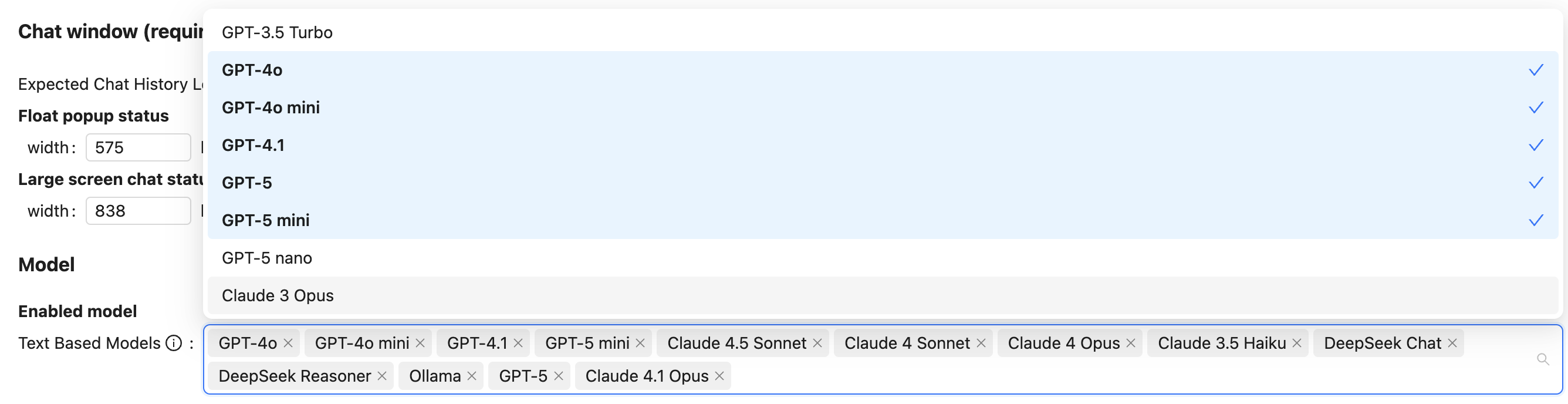
2025-10-12-0.1.93-Performance Optimization, Added GPT-4.1, GPT-5, Claude-4.1, Claude-4.5 Models
- Optimized the software architecture, improving conversation processing efficiency and response speed.
- Added and updated the latest AI model selections
- OpenAI: Added GPT-4.1 and GPT-5 models. (Please note: Model availability depends on OpenAI's official release and API access permissions.)
- Anthropic (Claude): Updated Claude models to the latest Claude 4.1 and Claude 4.5 versions, providing more powerful reasoning and content generation capabilities.
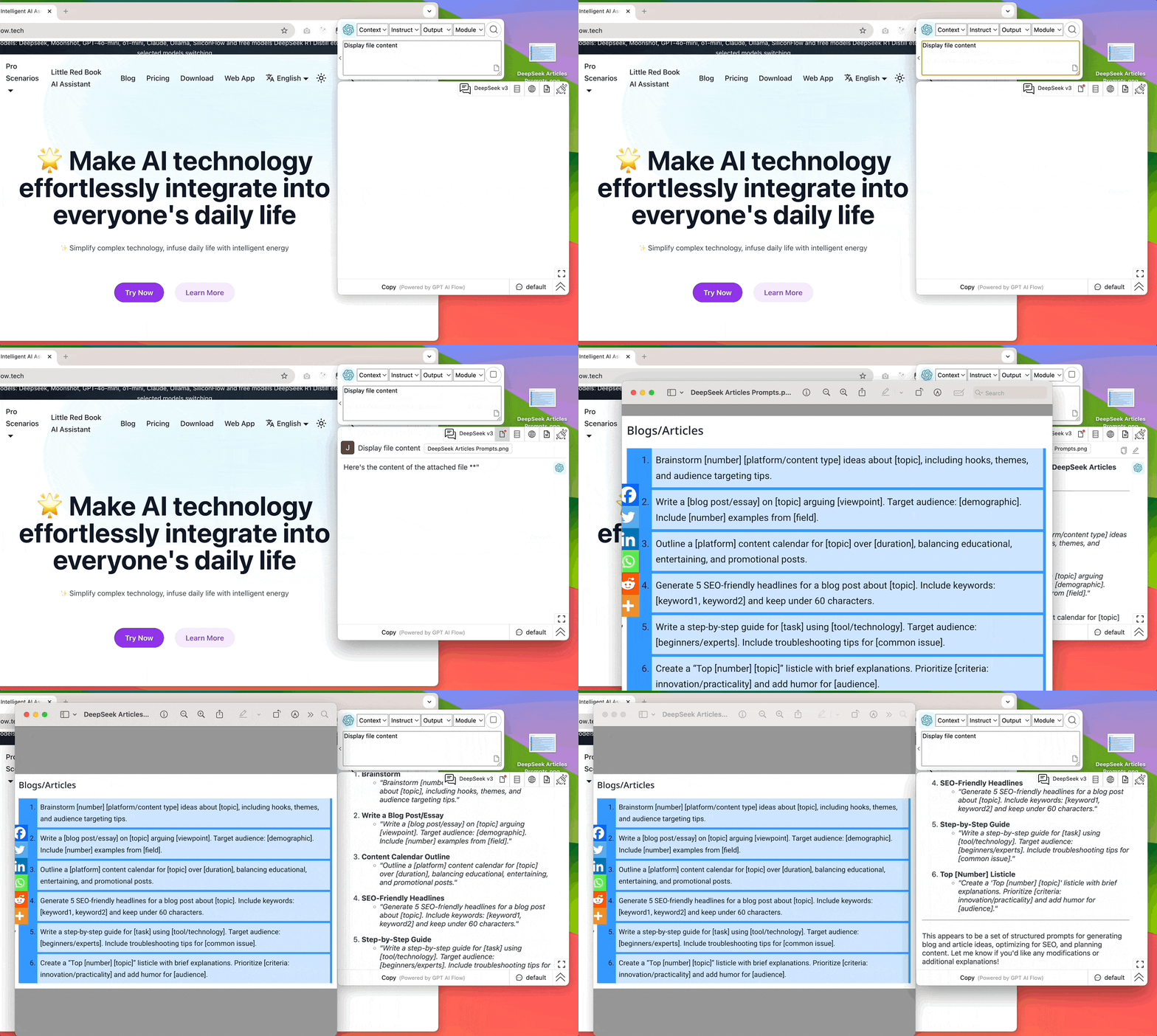
2025-04-13-0.1.92-Image PDF Document Upload Scanning (OCR) Feature, Personal Knowledge Base (beta)
Image PDF Document Upload Scanning (OCR) Feature
2025-03-31-0.1.90-File-upload-feat
2025-03-23-0.1.89-Introduction of Comparison Report Module (beta)
- Integration of Tavily tool.
- Comparison Report Module
- Fixed known product bugs
2025-03-16-0.1.88-Introduction of Online Functionality
2025-03-09-0.1.87-Product Experience Optimization, Introduction of Module Functionality
2025-03-02-0.1.86-Launch Module Features
Launch basic module features: Expression, Summary Tools, SEO Tools, Post Writing Tools (Xiaohongshu, LinkedIn, Twitter, Facebook), Comment Writing Tools.
2025-02-22-0.1.85-Integrated SiliconFlow Model Service Provider
Integrated SiliconFlow Model Service Provider.
2025-02-08-0.1.84-Optimize Product User Experience
Optimize product user experience.
2025-01-28-0.1.83-Integration of ollama local models
Integration of ollama local models.
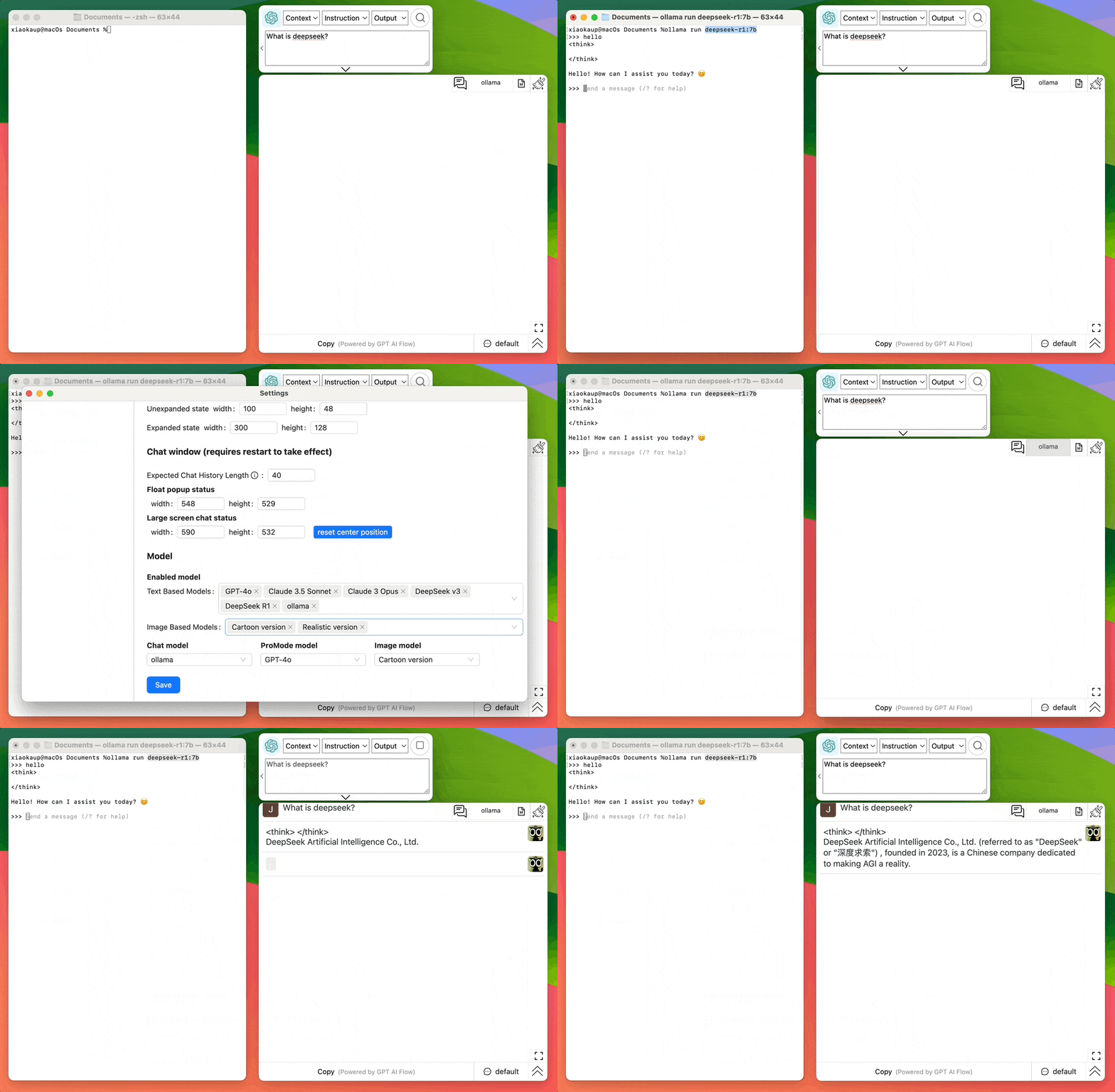
2025-01-26-0.1.82-Integrate Deepseek Model
Integrate Deepseek Model.

2025-01-25-0.1.81-Support for PDF Export of Chat History and Custom Avatar Settings
Introduction:
This update primarily enhances chat history management features, adding multiple export options and custom avatar settings to make your chat experience more personalized and convenient.
Update Notes:
✨ New Features
- Chat History Import/Export: Support for importing and exporting chat histories, making it easy to backup and migrate your conversations
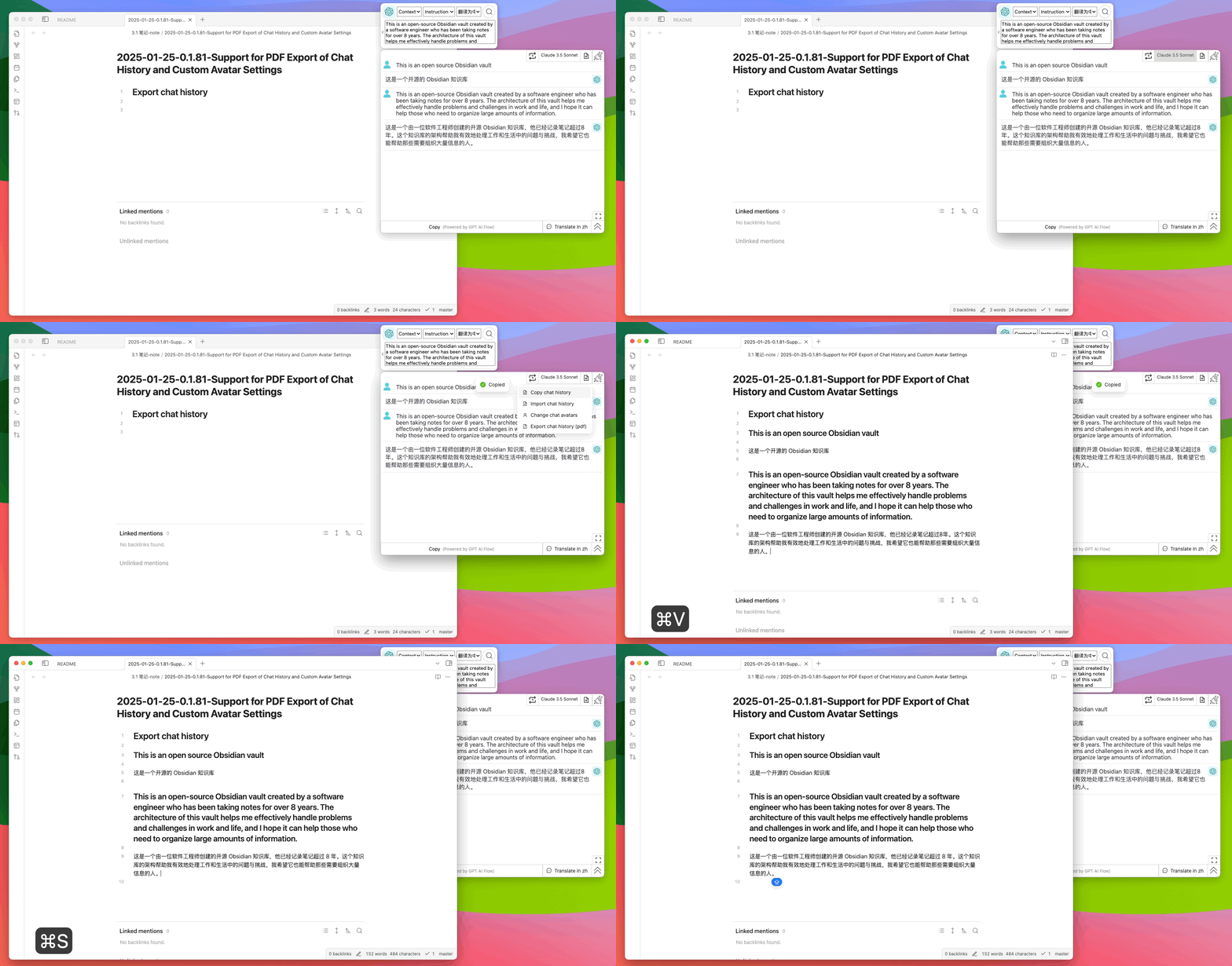
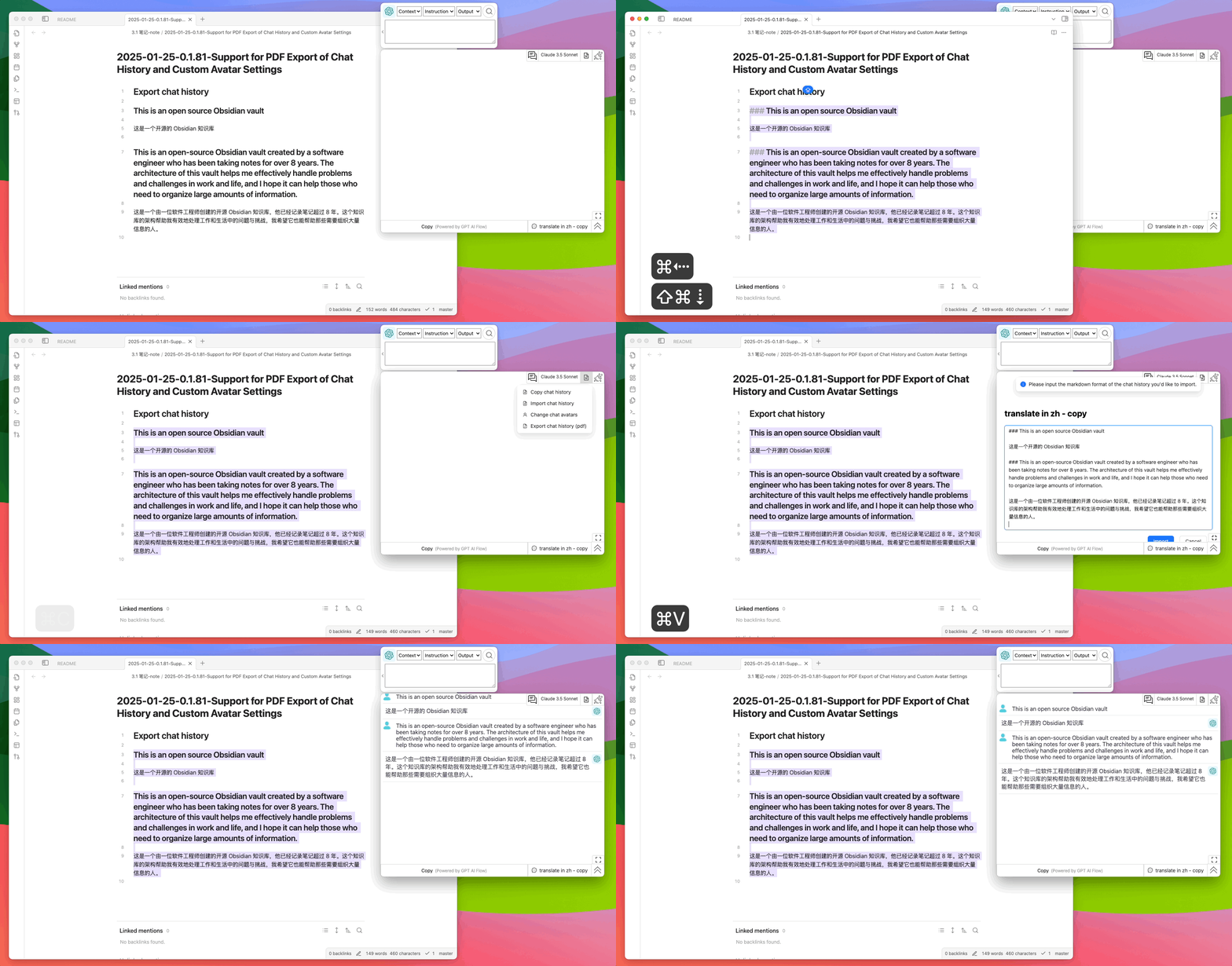
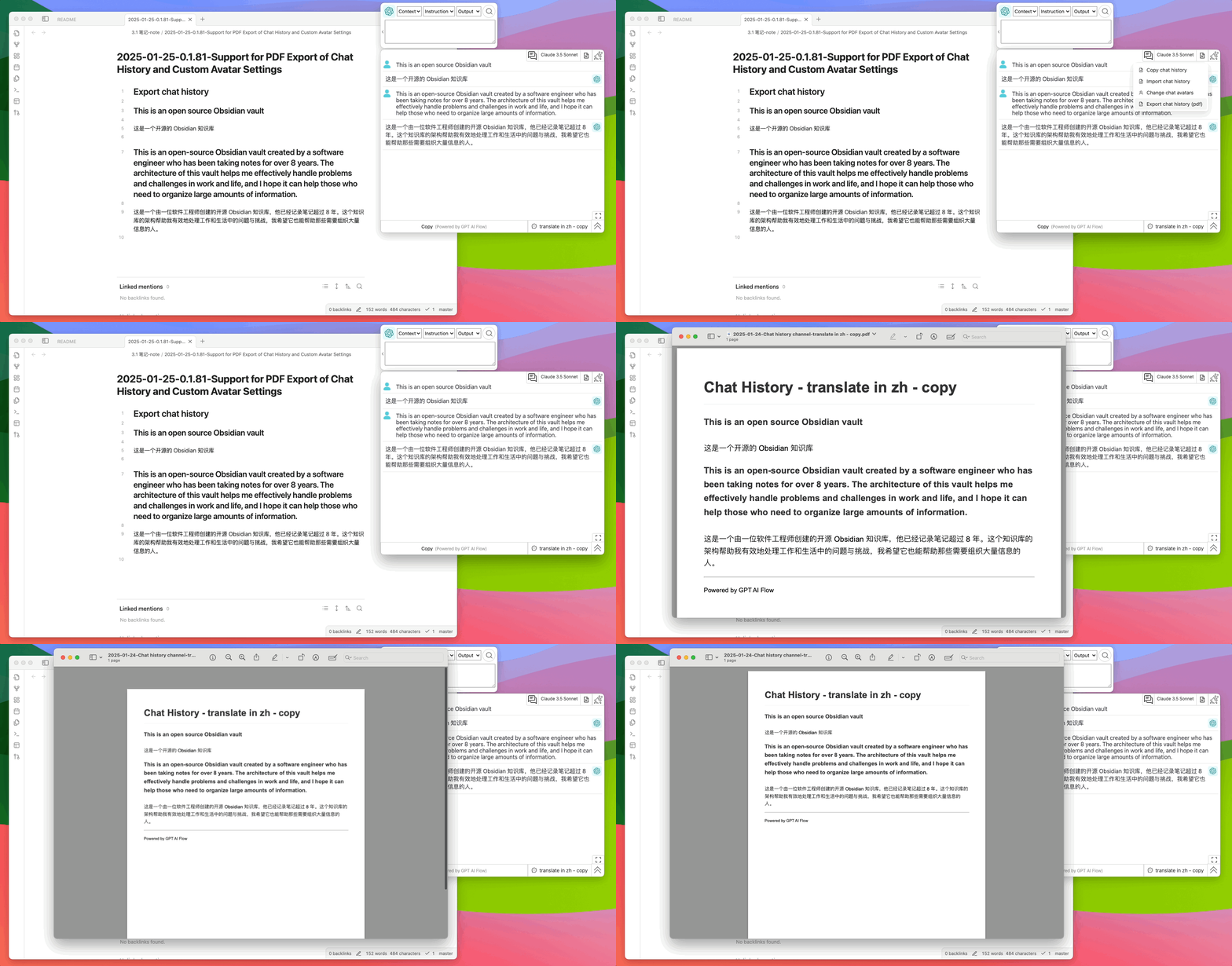
- PDF Export: You can now export chat history as PDF files for easy archiving and sharing
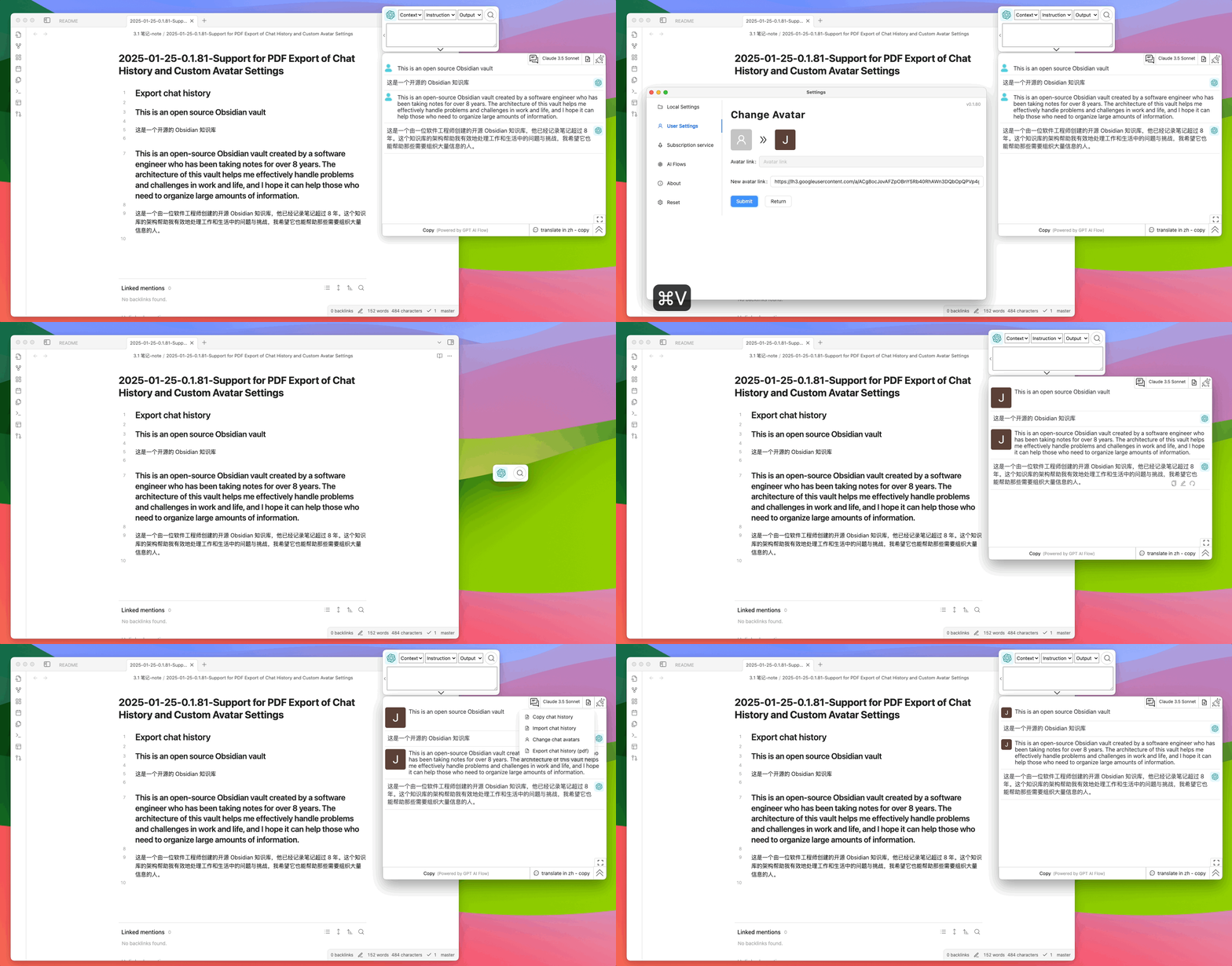
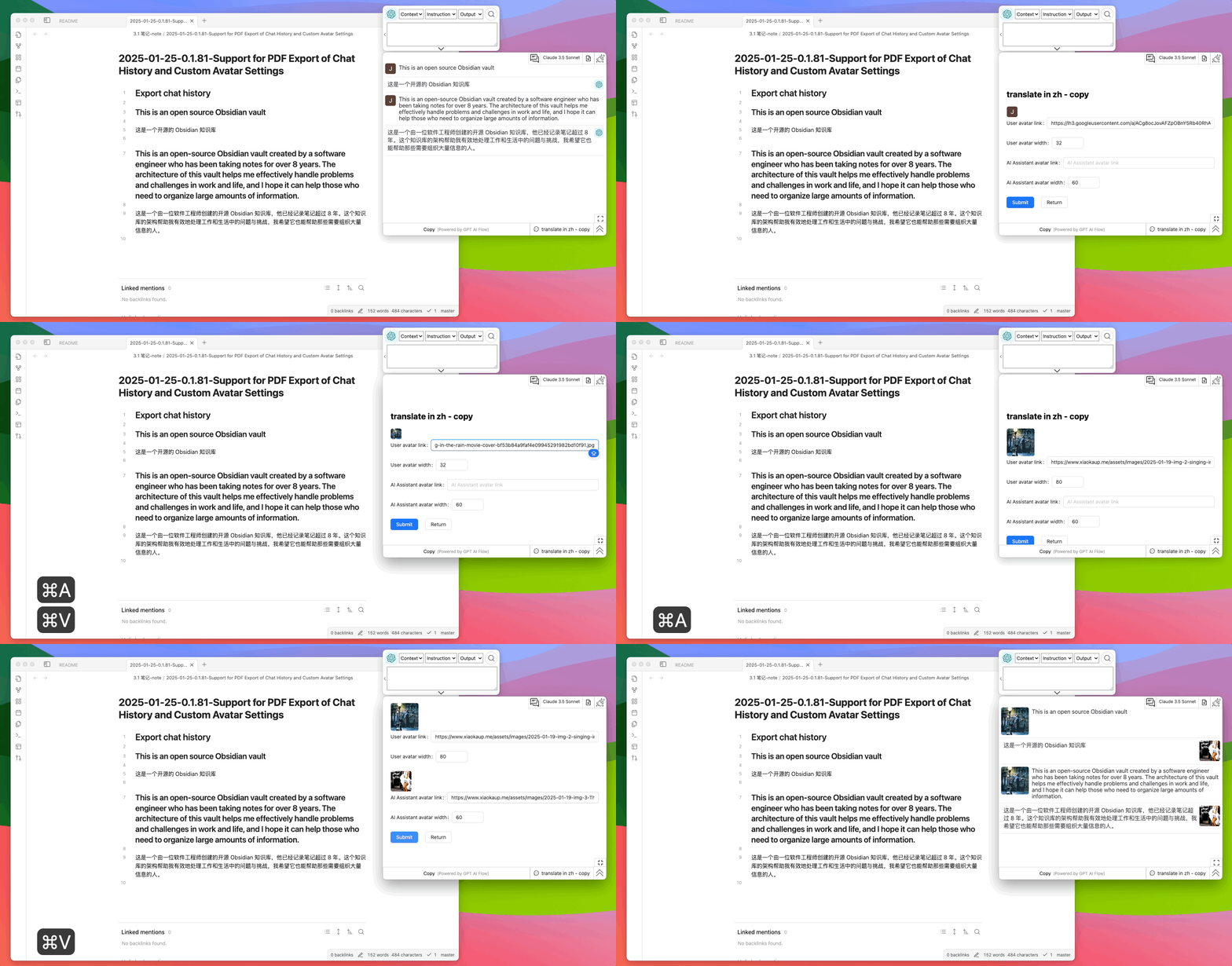
- Personalized Avatar Settings:
- Support for setting default personal avatar
- Custom avatar display for both user and assistant in each chat channel
🔧 Bug Fixes
- Fixed chat dropdown menu scrolling issues for improved user experience
💡 Tips: We recommend regularly exporting and backing up important chat records to ensure data security. The new avatar settings feature helps you better distinguish different chat scenarios.
2025-01-04-0.1.80-AI Dialogue Engine Upgrade: Multi-Model Support, Smarter Interactive Experience
Introduction: We are excited to announce the release of Smart Dialogue Assistant version 0.1.80. This update brings several important feature upgrades and performance optimizations, aimed at providing you with a smarter and more personalized conversation experience.
Description:
- New AI Engine Upgrade: We have updated the core langchain package and added advanced LLM models like moonshot, significantly improving the assistant's conversational capabilities and knowledge base.
- Upgraded core langchain framework
- Added new cutting-edge models including moonshot, gpt-4o-mini, o1-mini
- Support for multiple model switching, choose the most suitable dialogue engine as needed
- Interactive Experience Optimization
- Improved repeated dialogue patterns for more coherent conversations
- Enhanced user interface design, including avatar size adjustments
- Added convenient logout functionality
- System Performance Improvements
- Optimized UI/UX design
- Enhanced system stability
- Improved resource scheduling efficiency
This update marks an important step in our journey to create a smarter, more personalized dialogue assistant. We look forward to your feedback to help us continuously improve our product and provide you with better service.
2024-11-30-0.1.79 - Debut of Image Generation Feature
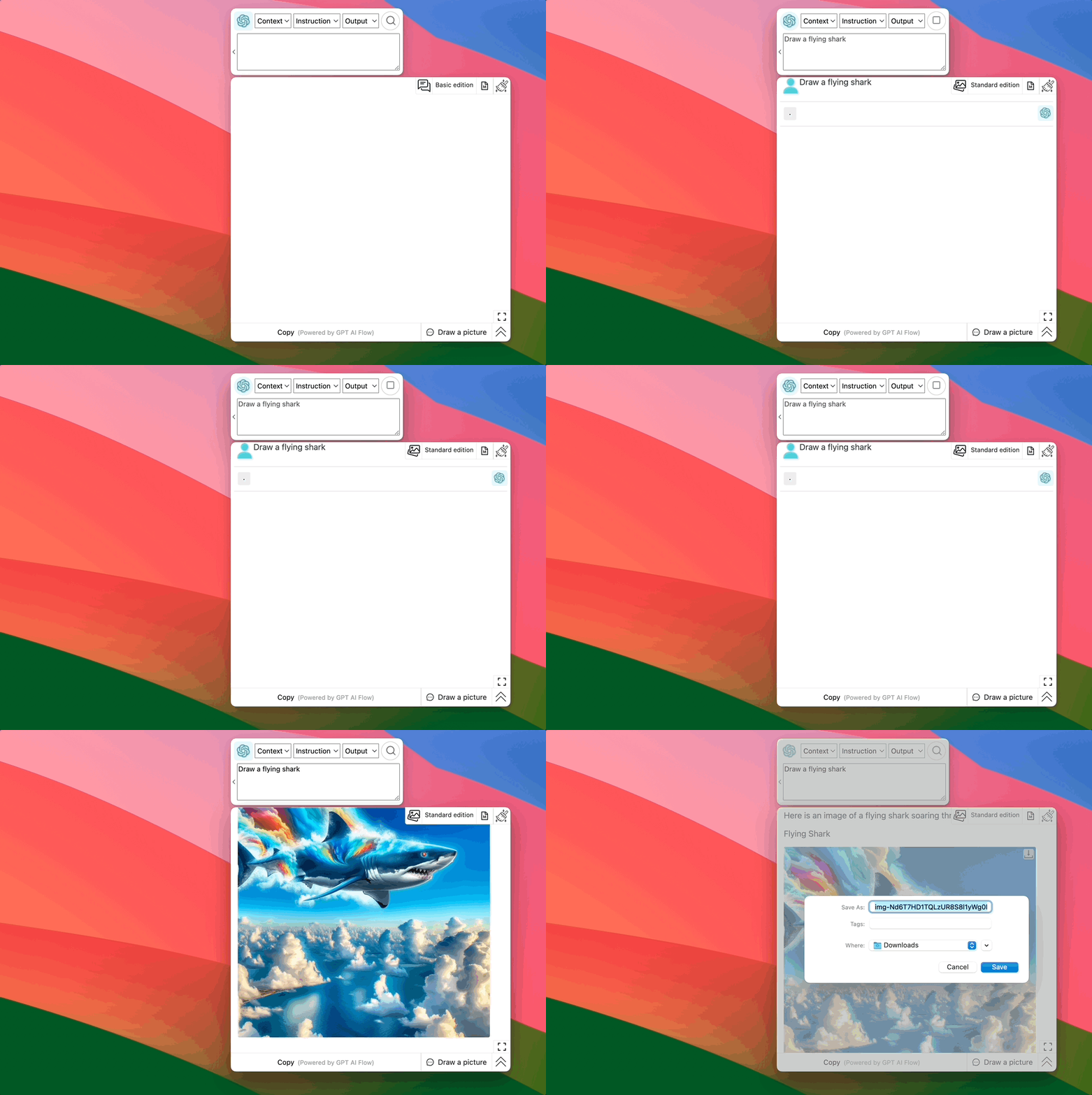
We are excited to announce the release of GPT AI Flow version 0.1.79. This version brings an exciting new feature - Image Generation (Beta). Now, users can experience AI-driven image creation with options for both cartoon and realistic styles. This significant update marks a notable expansion of our product's capabilities, providing users with a richer and more comprehensive AI creative experience.

Release Notes:
-
Image Generation Feature (Beta):
- This version introduces a brand new AI image generation feature, currently in the testing phase.
- Users can choose to generate images in cartoon or realistic styles.
- We encourage users to try this new feature and provide feedback to help us continuously improve and optimize.
-
Usage Notes:
- As a beta feature, image generation may still have some limitations or instabilities.
- We will continue to monitor and optimize this feature to provide a better user experience.
- If you encounter any issues or have suggestions for improvement, please contact us through the feedback channel within the app.
-
Future Outlook:
- We plan to further enhance the image generation feature in future versions, including adding more style options and improving generation quality.
- User feedback will play a key role in improving the feature, and we sincerely invite all users to participate in this process.
We believe this new feature will bring more creative possibilities to GPT AI Flow users. Thank you for your continued support, and we look forward to hearing about your experience!
2024-11-24-0.1.78(0.1.77-hotfix) Intelligent Dialogue Assistant: Important Update to Enhance User Experience
We are excited to announce the release of Intelligent Dialogue Assistant 0.1.77. This update focuses on optimizing user experience, bringing you more flexible conversation management, more convenient window control, and a friendlier interface layout. Whether for daily use or professional applications, these new features will significantly improve your user experience.
Update notes:
-
Channel Management Optimization:
- We have comprehensively upgraded the quick content dialogue channel management function.
- Now, you can set conversation modes separately for different channels, including continuous dialogue mode and single question mode.
- This improvement allows you to flexibly switch conversation methods according to different scenarios and needs, improving communication efficiency.
-
Window Pin Option:
- Added a "Keep window on top" setting option (disabled by default).
- When enabled, the application window will always stay on top of other windows, allowing you to access and use it at any time.
- This feature is particularly suitable for users who need to frequently refer to conversation content, greatly enhancing the convenience of multitasking.
-
Large Screen Dialogue Mode Optimization:
- In large screen dialogue mode, we have added a button to reset the center position.
- With a simple click, you can quickly reposition the conversation content to the center of the screen.
- This feature improves the user experience in large screen environments, making content browsing and interaction more comfortable.
We sincerely hope these updates will bring you a better user experience. We will continue to listen to user feedback and constantly improve and optimize the product. Thank you for your support and trust in the Intelligent Dialogue Assistant!
2024-10-31-0.1.76-Flexible Dialogue: Intelligent Conversation Upgrade for Enhanced User Experience
We are excited to announce the release of version 0.1.76, which focuses on improving user experience and conversation flexibility. We have introduced new window state switching functionality, added dialogue memory options, and optimized the overall interface to make your conversation experience more personalized and efficient.
Update notes:
-
Window State Switching:
- Added a "Window State Switch Button" allowing you to freely switch between side pop-up window and center full-screen dialogue modes.
- Shortcut support: Use Alt+Shift+C to quickly switch window states, improving operational efficiency.

-
Dialogue Memory Feature:
- Introduced a "Dialogue Memory/No Memory Switch Button" allowing you to choose whether to use the current conversation history, particularly useful in translation scenarios.
- Flexibly switch between single conversation and continuous dialogue modes to meet different scenario needs.

- User Interface Optimization:
- Comprehensive optimization of the software interface, providing a more intuitive and user-friendly operation experience.
- Improved overall user experience (UX) design, making your usage process smoother and more comfortable.
This update aims to provide you with a more personalized and efficient conversation experience. Whether you need quick Q&A or in-depth discussions, our new features can meet your needs. We look forward to your feedback to help us continuously improve the product. Update now and experience the new way of conversing!
2024-10-09-0.1.75-Enhanced Synchronization and Improved User Interface
We are excited to announce that version 0.1.75 of our application is now available! This update aims to enhance the cross-platform synchronization capabilities of the app, optimize the user interface interaction experience, and fix known interface display issues. We thank our users for their feedback and support as we continue to strive for a more stable and efficient user experience.
Update notes:
-
Two-way synchronization: You can now seamlessly synchronize data between the web and desktop versions of the application. Through the connect button on the web, any information on one platform will be synchronized to the other, ensuring your information is always up to date.
-
Main floating window quick tips: Quick tips now include a quick application feature for rapid application to the main floating window, allowing you to access frequently used functions more quickly, improving operational convenience.
-
Main floating window expand/collapse offset error fix: This update resolves the offset issue that occurred when expanding or collapsing the main floating window, now providing you with a smoother and more accurate interface display.
We are committed to continuously improving the quality of our product and user experience. Please stay tuned for our upcoming updates and feel free to provide us with your feedback and suggestions. Update to 0.1.75 now and experience the new features!
2024-09-28-0.1.74-Prompt Management Upgrade, User Experience Optimization
We are excited to announce the release of ChatGPT Assistant version 0.1.74. This update brings the long-awaited prompt import/export feature, along with fixes for several product bugs and comprehensive improvements to the user experience.
Notes:
-
Prompt Import/Export Feature:
- You can now easily export all your created prompts, facilitating backup and cross-device usage.
- Support for importing prompts shared by other users, enriching your AI conversations.
- Export format uses the universal Excel format, ensuring compatibility with other tools.
-
Bug Fixes:
- Resolved potential crash issues on certain devices.
- Fixed memory leak problems that could occur after prolonged use.
- Addressed issues where prompts couldn't be saved correctly under specific circumstances.
-
User Experience Optimizations:
- Redesigned the prompt management interface for more intuitive and user-friendly operation.
- Optimized the loading animation for AI responses, providing better visual feedback.
- Improved keyboard responsiveness for smoother input.
We are constantly working to enhance your user experience. If you have any feedback or suggestions, please don't hesitate to contact our support team. Thank you for your continued support!
2024-09-07-v0.1.73-Intelligent Conversation Companion: New Free Experience, Understands Your Needs, Always by Your Side
Welcome to the Intelligent Conversation Companion v0.1.73! We've listened to our users and comprehensively upgraded our product features to bring you an unprecedented intelligent interaction experience. Now, all intelligent assistant functions are completely free, allowing every user to enjoy the convenience brought by AI. We've also optimized the user interface for a smoother and more intuitive experience. Anytime, anywhere, the Intelligent Conversation Companion will be your most attentive AI assistant.
Update details:
-
Completely Free: We've opened up all software dialogue and smart prompt library functions, allowing every user to experience the charm of AI without limitations.
-
Data Autonomy: Users can now interact directly with large model providers, ensuring you have complete control over all your data, protecting your privacy and security.
-
Optimized User Experience:
- Added initial language selection feature, allowing you to use your most familiar language to converse with AI from the start.
- Included product usage guides to help new users quickly get started and fully unleash the potential of the AI assistant.
We sincerely invite you to update to the latest version and experience these exciting new features. Your feedback is crucial to us, and we will continue to strive to provide you with smarter and more attentive service. Update now and embark on your AI intelligent conversation journey!
2024-08-29-v0.1.71 - User Questions Editable, AI Answers Regeneratable
The brand new ChatGPT intelligent dialogue system v0.1.71 has been released with a bang! This version brings two revolutionary features: editable user questions and regeneratable AI answers. Now, you can modify your own questions at any time to get more precise answers; not satisfied with AI's reply? Regenerate with one click, making conversations more efficient and intelligent!
- Editable User Questions
- After submitting a question, you can modify and refine your question content
- Submit again after modification, and AI will provide a new answer based on the updated question
- The question editing function allows you to express your questions more accurately and get more satisfactory replies
- Regeneratable AI Answers
- Not satisfied with AI's answer? Now you can ask AI to regenerate the reply
- Click the "Regenerate" button, and AI will provide a brand new answer based on the previous dialogue context
- Retry multiple times until you get the best reply, greatly improving conversation quality and efficiency
The updated ChatGPT v0.1.71 intelligent dialogue system brings an unprecedented human-machine interaction experience. Edit questions at will, regenerate answers with one click, ushering in a new era of intelligent dialogue. You deserve to have it!
2024-08-24-v0.1.70 - Prompts Marketplace and Custom Shortcuts Feature
ChatGPT Assistant v0.1.70 brings two major updates: the brand-new Prompts Marketplace and the Custom Shortcuts feature. The Prompts Marketplace provides users with a rich variety of prompt resources, covering multiple categories to help you discover more creative inspiration. It also offers convenient search and recommendations, making it easy for you to find prompts that interest you. Custom Shortcuts allows you to flexibly set shortcuts, jump to designated chat channels with one click, and supports adding preset prefix and suffix content to improve input efficiency. Upgrade to the latest version and experience a more efficient and creative ChatGPT!
Product Description:
-
Prompts Marketplace
- Gathers a wealth of prompts resources, categorized and displayed by different categories
- Supports keyword search to quickly locate the prompts you need
- One-click launch of prompts content, directly applied to chat conversations
-
Custom Shortcuts
- Customize up to 4 sets of shortcuts and associate them with designated chat channels
- Press the shortcut to jump directly into the set channel, eliminating the hassle of frequent switching
- Support adding prefix and suffix content individually for each shortcut
- Prefix content will be automatically filled in at the beginning of the input box after jumping, while suffix content will be appended at the end
- Preset content supports editing and modification, with no character limit for more flexible input
Upgrade ChatGPT Assistant to v0.1.70 and take your AI experience to the next level. Feel free to provide feedback to help us continuously optimize the product and bring you better service.
2024-07-21-v0.1.69: Explore the Prompts Marketplace and Experience the Product's New Features Tour
We are thrilled to announce the official release of the brand-new v0.1.69 version! This version brings two major new features to users: the Prompts Marketplace and the Product's New Features Tour. The Prompts Marketplace is a platform full of creativity and inspiration for exchanging prompts, where you can browse, share, and discuss various interesting and practical prompts. The Product's New Features Tour, on the other hand, guides you through the core functions and usage tips of the product in a vivid and friendly way, allowing you to get started easily and fully unleash the product's potential.
Update Notes:
-
Introducing the all-new Prompts Marketplace feature:
- Browse prompts from multiple categories and discover more creative inspiration
- Support prompts search and recommendations to quickly find content that interests you
-
Added the Product's New Features Tour:
- Quickly understand the core functions of the product through a friendly product tour
- Vividly showcase the product's highlights and usage scenarios
- Guide the operation and usage tips of key features step by step
- Help new users quickly become familiar with the product and enhance the user experience
This version is dedicated to creating a more open prompts creative community for users, inspiring more inspiration and creativity through the Marketplace. At the same time, the thoughtful Product's New Features Tour makes the product easier to get started with, and its potential is fully tapped. Welcome to upgrade and experience, and embark on a new journey of AI creation!
2024-08-11-v0.1.68: Claude Integration, Conversation Management Upgrade, and New Pay-As-You-Go System
We are excited to announce the release of Intelligent Dialogue Assistant v0.1.68. This update brings major feature upgrades, including the integration of Anthropic's Claude model, improved conversation history management, and a new pay-as-you-go system. These new features will provide users with a smarter, more convenient, and more economical dialogue experience.
Update notes:
-
Anthropic Claude Model Integration
- We have successfully integrated Anthropic's advanced AI model Claude into our software.
- The Claude model is renowned for its excellent natural language understanding and generation capabilities, which will significantly improve dialogue quality and user experience.
- Users can now enjoy smarter and more fluid conversational interactions.
-
Chat History Management
- Added convenient historical conversation management features, allowing users to easily view, organize, and switch between past conversations.
- Supports quick restoration of previous conversation contexts, improving work efficiency.
- Provides better support for long-term use and multi-tasking.
-
New Pay-As-You-Go System (v3)
- Truly "pay for what you use".
- More transparent pricing, allowing users to better control usage costs.
- Provides official model services, ensuring high-quality dialogue experiences.
- Flexible payment options to meet the needs of different users.
This update marks an important step in our efforts to provide smarter and more personalized AI dialogue services. We look forward to your feedback to help us continuously improve our product and bring you a better user experience.
2024-07-28-v0.1.67: A More Streamlined Writing Experience
This update focuses on enhancing user experience by adding new features and optimizing existing systems to ensure a more efficient, secure, and convenient use of our product. Whether it's a simplified writing interface or a smarter image upload function, we strive to make each of your operations simple and effective.
Update Details
- Simplified Writing Mode: Introducing the "Easy Writing Post Interface," making input simpler and more intuitive, yielding ideal results. Whether you're a beginner or a professional user, you can quickly get started and improve your writing efficiency.
- Image Upload Feature: Upload images via Pro mode, and the system will automatically generate related text based on the content of the images, greatly simplifying the content creation process.
- Optimized Popup Interface: We've improved the implementation of the code block feature and optimized the popup interface design, enhancing the user experience of dialog displays.
- Enhanced Security: Converted the API key input from text to password form, increasing security and protecting user data from leaks.
- Customizable Chat Length: New functionality allows users to flexibly set the length of chats according to personal needs, thereby better controlling token consumption and making resource use more economical.
- Improved Interaction Between Desktop and Web Applications: Optimized the interaction between desktop applications and web apps, allowing API keys to be seamlessly used across platforms, simplifying operational processes, and enhancing user experience.
2024-06-22-v0.1.66: Experience Smoother Interaction between Professional Mode and Desktop Application
We are excited to announce that with the latest update to version v0.1.66, we have significantly optimized the interaction between the professional mode of our website and the desktop application. This update is aimed at enhancing the user experience, ensuring seamless connectivity and more efficient workflow between the two platforms.
Update details:
Interaction Optimization: We have improved the interaction logic between the website's professional mode and the desktop application, allowing users to switch and operate more smoothly between the two platforms. Enhanced User Experience: The interface elements have been meticulously adjusted to enhance visual clarity and intuitiveness, making it easier and more comfortable for users during operation. Performance Improvements: Enhanced backend capabilities have increased data processing speeds, ensuring faster response times and more stable performance. We are committed to continuously improving user experience, and with this update, we hope users can use our professional mode and desktop application more efficiently and enjoyably. As always, we look forward to your feedback to further refine and enhance our offerings.
2024-06-15-Multi-Functional Professional Toolkit v0.1.64 — Now with Google Login and Enhanced Content Optimization Features!
Our latest version v0.1.64 introduces several exciting new features! Users can now log in with their Google accounts for a more convenient access experience. Additionally, the new professional mode offers more powerful tools for content creators, including image cropping, communication, comment writing, headline and tag rewriting, and a new SEO webpage optimization module to better attract your target audience.
Update Details
- Google Login: Users can now log in directly using their Google accounts, simplifying the access and operation process.
- Professional Mode Enhancements:
- Image Cropping Tool: Supports specific image needs for different social media platforms, making content more suitable for various channels.
- Communication Module: Strengthens expression and reply capabilities, improving the quality of user interaction.
- Comment Writing Module: Helps users generate more engaging comments more efficiently.
- Headline Rewriting Module: Automatically optimizes headlines to attract more viewer attention.
- Tag Rewriting Module: Enhances tag relevance and search optimization, increasing content discoverability.
- SEO Webpage Optimization Module: Adds new webpage optimization tools to improve website ranking in search engines, increasing traffic and visibility.
Adapting to the changes in market and user demands, we warmly invite all users to experience this new upgrade. Whether you are a content creator or a marketing expert, this update will bring you more value and a better user experience. Update now and experience it!
2024-05-23-Content Creation Accelerator v0.1.62: A Multifunctional Assistant for Self-Media Creators
Product Introduction
Content Creation Accelerator v0.1.62 is a comprehensive upgrade specifically designed for self-media creators. It offers a range of powerful new tools and features to make content creation faster, more efficient, and more professional. Whether you're engaging in professional-level photo editing, writing, or topic expansion, this version is the ideal choice.
Update Details
- Added Professional Mode Module: Introduces a new Professional Mode, offering advanced users more sophisticated operational options to meet the needs of users at different levels.
- Self-Media Type Recommendation: Intelligently recommends the most suitable type of self-media accounts based on users' personal interests and current trends, and provides practical operational strategies.
- Topic Expansion Tool: Utilizes existing materials and events to intelligently generate relevant topic suggestions, helping users expand their content and enhance the reach and impact of their posts.
- Post-Writing Wizard: Enhances post structure and visual effects through advanced background setting and content adjustment tools, significantly improving writing efficiency.
- Post Rewriting Tool: Quickly generates new posts or rewrites content based on existing posts, enhancing the innovation and diversity of the content.
- Image Size Adjustment Tool: Customize image sizes to fit various social media platforms, including choosing preset optimal sizes or manual adjustments to make content more appealing.
Upgrade to Content Creation Accelerator v0.1.62 to unlock your creative potential and make every post shine!
Thank you for your continued support. We hope GPT AI Flow plays a significant role in your digital journey. Download now, join our free users, and enjoy the convenience technology brings! If you encounter any issues or have suggestions during use, feel free to provide feedback anytime.
2024-05-11-Post-Writing Wizard v0.1.61-Equipped with Upgraded Professional Mode!
Introducing the brand-new Post-Writing Wizard v0.1.61, bringing unprecedented convenience and professionalism to your content creation! This update focuses on enhancing the user experience and expanding the range of functions, particularly adding diverse language support and a rich examples column to help you effortlessly handle various writing needs. More importantly, our newly designed communication mode aims to provide more efficient and direct feedback mechanisms and collaboration opportunities during writing, creating a seamless creative process.
Description:
- Diversity of Languages: This upgrade adds a wider range of language options, allowing you to create content more accurately and comfortably, no matter the language of your target audience.
- Rich Examples Column: The added examples column provides intuitive guidance and inspiration for all types of writing. Whether it's social media posts, professional articles, or daily blogs, you'll find inspiration here.
- Upgraded Communication Mode: To better meet the needs of multi-author collaboration and feedback solicitation, we've introduced a new communication mode. This not only makes team communication more efficient but also simplifies the collection and integration of feedback.
- Performance and Stability Enhancements: While expanding functionality, we have not overlooked the basics - performance and stability have also been comprehensively optimized to ensure a smooth experience during use.
Whether you are a writing novice or an experienced author, Post-Writing Wizard v0.1.61 is an invaluable assistant for you. Experience it now and start your professional writing journey!
Thank you for your continued support. We hope GPT AI Flow plays a significant role in your digital journey. Download now, join our free users, and enjoy the convenience technology brings! If you encounter any issues or have suggestions during use, feel free to provide feedback anytime.
2024-05-10-Post-Writing Wizard v0.1.60-Professional Mode Upgrade
Adapting to the ever-growing needs of content creators, the latest version of the Post-Writing Wizard v0.1.60 brings a series of powerful upgrades to Professional Mode, providing you with a more personalized, efficient post creation experience. From custom backgrounds to content adjustments, from post version management to repetitive regeneration, all these features are designed to help you more easily produce and manage posts, inspiring writing creativity and innovation. Update Description
- Innovative Post Background and Content Adjustment Tools: Users can now more freely customize the appearance of their posts. Choose from a rich library of backgrounds, and adjust the post's layout, color, and typography using intuitive editing tools to make each post more visually impactful and enjoyable to read.
- Version History and Recovery Function: Worried about accidentally losing carefully crafted post drafts? The new version provides a comprehensive version history recording feature. Users can browse and retrieve previous post versions, ensuring that every spark of inspiration is preserved.
- Regeneration Based on Existing Versions: Further optimize content or explore the same theme from multiple perspectives. We understand that creative work often requires refinement, hence the introduction of regeneration based on existing versions. Users can select a previous version as a starting point for a new round of creation.
Be sure to update to v0.1.60 to experience these exciting new features and take your post creation to a new professional level!
Thank you for your continued support. We hope GPT AI Flow plays a significant role in your digital journey. Download now, join our free users, and enjoy the convenience technology brings! If you encounter any issues or have suggestions during use, feel free to provide feedback anytime.
2024-05-04-Enhanced Efficiency and Smoothness Explore v0.1.57 New Features
Welcome to experience the latest iteration of our product! Our version v0.1.57 brings you a brand-new Professional Mode v4 interface and introduces an auto-updater to further simplify and accelerate your workflow. This version aims to optimize the user experience and enhance the intuitiveness of operations through a series of updates.
Version Description:
- Brand New Professional Mode v4: Launch the new Professional Mode, bringing improved functionality and a more streamlined interface, activating your efficient work state.
- Professional Mode Reset Function: Allows you to quickly return to default settings, convenient for fast adaptation and use in different scenarios.
- Smart Auto-Update: Introduced a new auto-update feature, no need to manually download new versions, ensuring you always use the latest and most stable version of the software.
- AIFlow Version 2 Adjustments: Key optimizations were made in the AI workflow tool, making settings and applications smoother and more intuitive.
- Enhanced Stability: Removed old unnecessary components and shut down no longer used connections, making the software run more sturdily and reliably.
- Interface and Operational Detail Optimization: We have readjusted and updated the user interface design, improving the friendliness of the user experience.
- Code Cleanup: By removing unnecessary code, we have made the software run smoother, reducing potential errors, and improving operating efficiency.
Experience this array of innovative features that make your tools smarter and more helpful. Update now, unlock a new realm of productivity!
Thank you for your continued support. We hope GPT AI Flow plays a significant role in your digital journey. Download now, join our free users, and enjoy the convenience technology brings! If you encounter any issues or have suggestions during use, feel free to provide feedback anytime.
2024-04-09-v0.1.44-GPT AI Flow Free International Version
Product Introduction:
Welcome to experience the latest version of GPT AI Flow v0.1.44, now fully available as a free international version! We continuously listen to our users' voices, committed to providing more diverse and inclusive services. This update is not only a commitment to our global users but also demonstrates our determination to offer high-value solutions. Download now and start enjoying our free services, experience the boundlessness of convenience and reliability!
Version Description
- Globally Universal: No matter where you are, you can easily access and use our free software.
- Zero-Cost Experience: Access the basic features of our software for free, without worrying about any hidden costs.
- Trusted Quality: Even as a free version, we ensure the software's quality is uncompromised, committed to providing a stable and reliable user experience.
- Continuous Support and Improvement: We regularly release version updates to ensure the software's functions are perfected and the user experience is enhanced.
We look forward to your valuable feedback, as your every review and suggestion will directly impact the future of our product. Please contact us through email at hello@gptaiflow.com or use our online feedback system to share your usage experiences and needs.
Thank you for your continued support. We hope GPT AI Flow plays a significant role in your digital journey. Download now, join our free users, and enjoy the convenience technology brings! If you encounter any issues or have suggestions during use, feel free to provide feedback anytime.
2024-02-04-v0.1.42-Major Update of Official Customer Service Assistant and ProMode Professional Mode Command Chain / XiaoHongShu Expert Official Test Database
Product Introduction:
Welcome to experience our latest version v0.1.42, we bring a range of function optimizations and new features to enhance your user experience! The introduction of the new GPT AI Flow Customer Service Assistant can intelligently answer user inquiries, significantly improving customer service efficiency. Additionally, specifically designed for professional users, the ProMode professional mode has been upgraded, optimizing the command chain processing flow, making operations smoother and more efficient. We have also introduced an official database specifically for XiaoHongShu experts in the testing phase, providing more precise data support for content creators. For convenient operation, a new Alt+0 shortcut key feature allows you to quickly clear history, ensuring a tidy workspace.
Version Description
- Customer Service Assistant: Adds the new GPT AI Flow Customer Service Assistant, employing advanced artificial intelligence technology, making customer responses faster and more personalized.
- ProMode Professional Mode Command Chain Optimization: Optimizes the ProMode professional mode's command chain processing flow, improving the accuracy and speed of command execution.
- XiaoHongShu Expert Official Database (Testing Phase): Introduces the XiaoHongShu expert official database, aiming to help professional users precisely locate market and audience data.
- Quick Clear History: Adds a shortcut key
Alt+0, which users can use to quickly clear history, maintaining an efficient and tidy work environment.
We continue to listen to user feedback and are committed to continuously updating and improving to provide a better product experience. Download v0.1.42 now, and enjoy more professional and intelligent services!
2024-01-22-v0.1.40-Trial Optional Version and Professional Mode Upgrade
Welcome to experience the latest version of XiaoHongShu Expert v2! In v0.1.40, we have significantly optimized the user interaction experience and significantly enhanced software performance. This update includes new features added to the information dialogue window and improvements in the copy section based on user feedback, also providing more flexible trial options. Now, users can choose the tool version or model version according to their needs, obtaining a more personalized user experience. Additionally, by upgrading software dependencies, we ensure the software runs more stably, providing better performance. Update now, and experience a smoother and more efficient XiaoHongShu Expert v2!
Update Description:
- New G3, G4 Model Type Tags: The information dialogue window now includes new model type tags, allowing users to quickly identify and select data models suitable for their needs.
- Improvements in Copy Section: Responding to user feedback, we adjusted the copy mechanism to allow users to selectively copy needed text information.
- Optimized Trial Versions: Provided more flexible trial version options, allowing users to choose the tool version or model version according to their needs.
- Code and Software Dependency Major Upgrade: By upgrading software dependencies and optimizing code, we achieved significant improvements in software performance, ensuring a smoother user operation experience.
- Professional Mode Upgrade: The professional mode of XiaoHongShu Expert has been upgraded to v2, offering more professional tools and features to help users more effectively manage content creation.
Update to v0.1.40 now, enhancing your GPT AI Flow user experience!
2023-12-29-v0.1.39-Professional Mode Enhancements and User Experience Optimization
Product Introduction:
This update focuses on providing a more flexible operation experience for professional mode users and has meticulously optimized the entire application's user interface. By introducing more model choices and a new temporary model option, we ensure you can experience higher customization and efficiency in professional mode. Simultaneously, we continuously strive to enhance the platform's overall user experience, making using GPT AI Flow a pleasant and efficient daily activity for every user.
Update Description:
- Partial proMode Command Upgrades: We have upgraded some of the commands in professional mode, now you can choose models more suitable for your needs to get better results when performing professional tasks.
- Added Temporary Model Option in Professional Mode: To provide more flexibility, we have added a temporary model option in professional mode. This means you can temporarily switch to different models according to the specific needs of the current task without changing the default settings.
- Optimized User Experience: We are committed to continuously improving user experience. In this version, you will find that all aspects of the application, including interface fluidity, interaction intuitiveness, and access speed, have been improved, ensuring your user experience is smoother and more enjoyable.
Update to v0.1.39 now, and enjoy a whole new experience with GPT AI Flow! We look forward to your valuable feedback, which we use as motivation for continuous improvement. If you encounter any issues or have suggestions during use, feel free to provide feedback anytime.
2023-12-15-v0.1.38-New Personal Creation Mode, Desktop Experience Enhancement
Product Introduction:
In this update, we focused on providing a smoother, more intuitive user experience for desktop users. The introduction of the brand-new personal creation mode empowers content creators with more freedom and flexibility, not only optimizing the process of writing and editing but also providing more personalized tools and features, allowing each creator to shine in their unique way on the XiaoHongShu platform.
Update Description:
- Added Personal Creation Mode: The XiaoHongShu professional module now includes a new personal creation mode, allowing creators to edit and publish original works more flexibly, also offering a more diverse range of layout and editing tools to support various creative needs.
- Optimized User Experience: We have comprehensively optimized the desktop interface and interaction design, enhancing the fluidity and convenience of operations, ensuring you can more efficiently browse and create content.
- Improved Stability and Performance: We have further optimized the program's overall stability and performance, ensuring a consistent user experience during prolonged use.
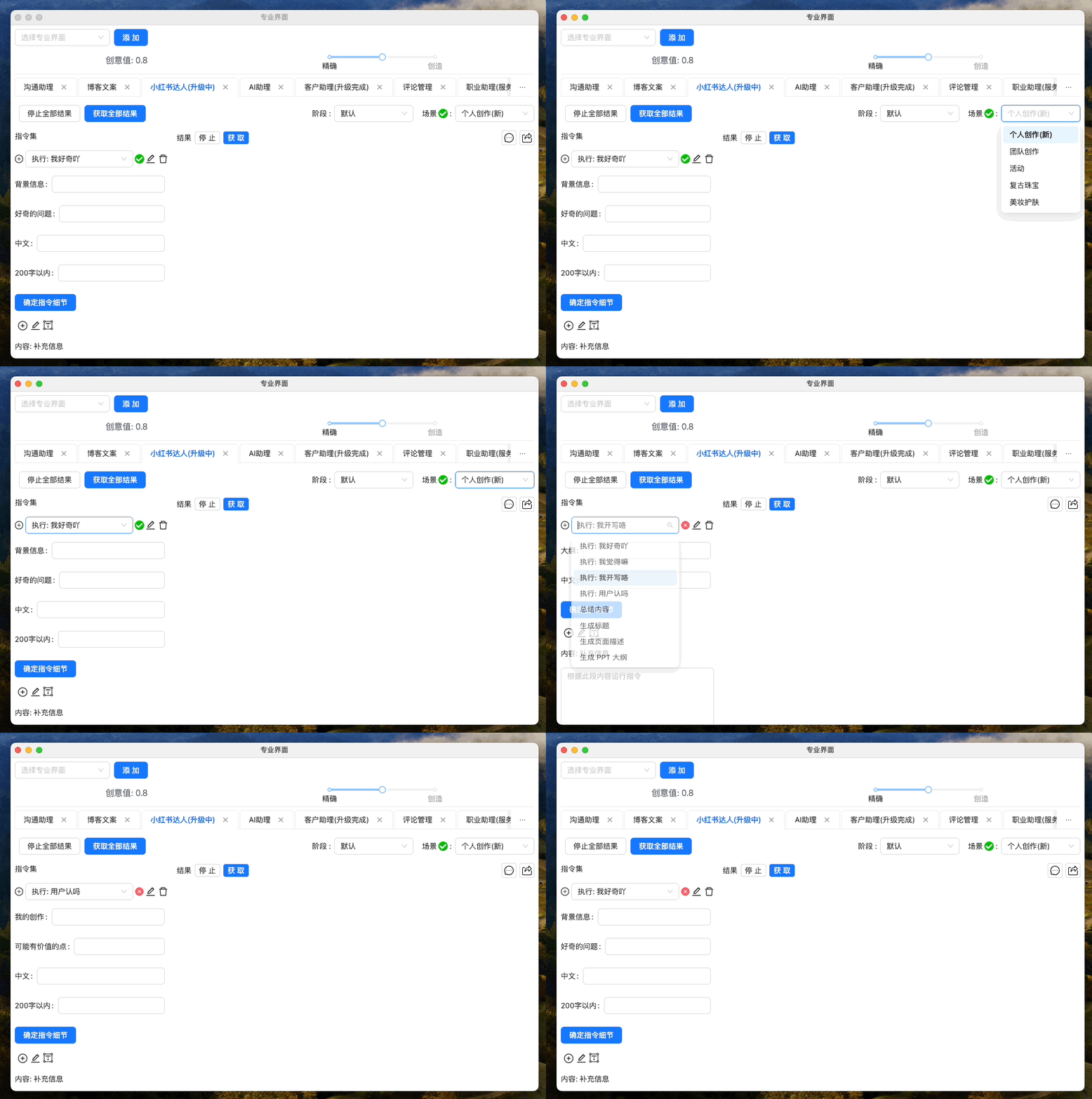
We are always committed to technological innovation and functionality perfection to provide a better product experience for our users. Thank you for your continued support, and we look forward to your creative achievements in the new version! If you encounter any issues or have suggestions during use, feel free to provide feedback anytime.
2023-12-06-v0.1.37-OTA-1-Comprehensive Upgrade of the Intelligent Assistant Platform, More Accurate Professional Mode!
Product Introduction:
Welcome to experience the newly updated Intelligent Assistant Platform v0.1.37-OTA-1. This update brings comprehensive enhancements to the professional mode, involving multiple function modules. Whether you are a communication assistant, blog writer, XiaoHongShu expert, AI technology expert, customer service representative, content manager, UP main, product manager, or marketer, our platform can provide you with more accurate, efficient services to meet your growing professional needs. Let's explore the exciting content of this update! If you encounter any issues or have suggestions during use, feel free to provide feedback anytime.
Update Description:
- Intelligent Communication Assistant: Enhances the language model's response speed and conversational accuracy, better understanding and responding to customer needs.
- Blog Copy Creation: Upgrades the copy generation tool, enhancing the accuracy and creativity of writing assistance to attract more readers.
- XiaoHongShu Expert Assistant: Optimizes the content recommendation algorithm, enhances personalized settings, and improves content-audience matching.
- AI Assistant Module: Enhances AI's understanding and task execution efficiency, making technical support more intelligent.
- Customer Assistant Function: Improves the accuracy of customer service responses, optimizing user experience and satisfaction.
- Comment Management Tool: Introduces a smarter comment filtering and feedback mechanism, improving the efficiency of content management.
- UP Main Content Creation Assistant: Enhances the auxiliary capability for video and social media content creation, improving audience interaction.
- Product Manager Assistant: Strengthens market analysis and product planning tools, aiding in rapid product iteration and market adaptation.
- Marketing Assistant: Enhances the accuracy of market trend analysis and marketing strategy recommendations, providing strong data support for marketing decisions.
All modules' accuracy and precision have been significantly improved, ensuring your performance in professional fields is more outstanding. Update now, and enjoy the comprehensively enhanced intelligent assistant services! If you encounter any issues or have suggestions during use, feel free to provide feedback anytime.
2023-11-29-v0.1.37 - Enhanced Imitation Case and Copywriting Functionality!
Product Introduction:
Welcome to the latest version v0.1.37 of the Creative Content Assistant, designed specifically for content creators, marketers, and writing enthusiasts to boost the efficiency and quality of their content creation. In this version, we have introduced built-in imitation content cases, providing users with a wealth of reference materials. Additionally, we have significantly enhanced the content imitation functionality to support more diverse and high-quality content creation. We have also optimized the command input experience, making user operations smoother and more seamless.
Product Description:
- Built-in Imitation Content Cases: We have meticulously prepared a series of high-quality imitation cases covering various styles and themes. Users can directly use these cases to inspire their own creations or adjust and rewrite them as templates to quickly generate content with personalized characteristics.
- Enhanced Content Imitation Functionality: Based on user feedback and the latest technological advancements, we have comprehensively enhanced the content imitation functionality. Whether it's imitating language styles or copying structures and themes, our tools provide more intelligent and precise imitation capabilities, helping users easily create content that meets demands and is innovative.
- Optimized Command Input Experience: To make the user experience more intuitive, we have fully optimized the command input. The new command input logic aligns more with user habits, and the interface interaction design is more intuitive, making user operations more efficient and reducing the learning curve.
Whether you are looking for inspiration or need to quickly produce high-quality copy, Creative Content Assistant v0.1.37 is an indispensable tool. Update now to unlock your creative potential! If you encounter any issues or have suggestions during use, feel free to provide feedback at any time.
2023-11-25-v0.1.36 - Professional Mode Upgrade and Beauty Skincare Content Creation Support
Product Introduction:
Our latest update, v0.1.36, aims to enhance user experience and expand the scope of content creation. This update focuses on optimizing the Professional Mode and has added a beauty skincare scenario to the XiaoHongShu Expert professional module, providing beauty experts with richer content creation and skincare advice tools.
Update Details:
- Professional Mode Optimization: We have finely tuned the operation process of the Professional Mode, improving the handling of mode stages, allowing users to create and manage content more smoothly, thus enhancing work efficiency and content quality.
- Added Beauty Skincare Scenario: Responding to the demands of beauty content creators, the v0.1.36 version has added a beauty skincare scenario in the XiaoHongShu Expert professional module. This allows creators to integrate professional knowledge and personalized advice directly into their content, also helping users obtain practical skincare information.
- Content Creation and Skincare Advice Phase Configuration: To further support beauty creators, we have added two custom stages: Content Creation and Skincare Advice. The Content Creation stage is dedicated to providing flexible editing tools and a rich resource library to inspire creativity and enhance content quality. The Skincare Advice stage aims to help creators provide more professional and targeted skincare guidance, meeting users' desires for professional advice while pursuing beauty.
We firmly believe that with this update, v0.1.36 will further solidify our product's leadership in the content creation market, while also bringing deeper value and a superior experience to our users. Experience v0.1.36 now and embark on your professional content creation journey. If you encounter any issues or have suggestions during use, feel free to provide feedback at any time.
2023-11-16-v0.1.35 - XiaoHongShu Expert Professional Mode Upgrade - Smarter AI Commands, Richer Model Selection!
Product Introduction:
As social media marketing continues to evolve, XiaoHongShu, as a leading lifestyle sharing platform, is committed to providing influencers with a more efficient and personalized content creation experience. We are pleased to announce that the XiaoHongShu Professional Mode has been comprehensively optimized in version v0.1.35, especially the AI command settings for influencers have been upgraded, making them smarter and easier to use. Additionally, we have listened to extensive feedback from influencers and added more model choices to meet the diverse needs of experts in different fields.
Version Details:
In XiaoHongShu v0.1.35, influencers will experience the following new and improved features:
- Optimized AI Command Settings: We have fine-tuned the AI commands in Professional Mode, allowing influencers to more precisely control the desired effects when creating content. The new AI commands not only respond faster but are also more intuitive, making operations smoother.
- More Model Choices: To support influencers in creating more diverse content on XiaoHongShu, we have added a range of efficient model options. Whether it's experts in the fields of food, fashion, or travel, they can find tools more suited to their content style in a broader model library.
This update aims to further enhance the content creation experience and content quality on the XiaoHongShu platform through smarter tools and broader choices. We believe that ongoing technological innovations will bring more possibilities to the XiaoHongShu community. Update to v0.1.35 now and start your new professional creation journey!
2023-11-08-v0.1.34 - Payment Process Optimization and AI Model Update
Product Introduction:
In the update of v0.1.34, we primarily focused on integrating and optimizing the payment process, adding the latest generation of the big model-4-preview AI model choice, and optimizing the performance code, providing a smoother user experience. Additionally, necessary text updates and subscription logic handling were also adjusted in this version.
Product Description:
- Payment Process Integration: Our technical team has comprehensively integrated the existing payment process to better align with user habits, providing a smoother payment experience.
- Big Model-4-preview Model Choice: We have added the latest big model-4-preview model choice, allowing users to enjoy the advantages brought by cutting-edge AI technology.
- Performance Code Optimization: We have optimized the performance code, which will enhance the overall system performance, providing a smoother, faster user experience.
- Subscription Logic Update: This version optimized the subscription database v2 and added an expired subscription handling mechanism, making subscription management more convenient for users, while also updating the corresponding text to make operations more intuitive.
Through these updates, we hope to further enhance the user experience. Thank you for your support of our product, and we will continue to work hard to provide you with superior service. If you encounter any issues or have suggestions during use, feel free to provide feedback at any time.
2023-11-06-v0.1.33: ProMode Professional Mode Update—More Advanced Data Structure and User-Friendly Interactive Experience
Product Introduction:
We are pleased to announce the latest version v0.1.33 of the ProMode Professional Mode is now available. We have made some important upgrades and improvements in this version to help users better use our product. In this version, we have upgraded from professional module v2.0 to professional module v3.0, and our professional mode settings can now be applied in dialogues, allowing users to personalize the use of AI based on existing professional answers directly through dialogue. Additionally, we have added stage settings in professional mode, giving each module the opportunity for OTA upgrades in the future.
Product Description:
- IProMode Data Structure Upgrade: From professional module v2.0 upgraded to professional module v3.0, further enhancing the product's performance and stability.
- Professional Mode Settings Dialogue: Users can directly set professional mode in the dialogue box, not only facilitating user use but also enhancing the product's interactive experience.
- Added Stage Settings: We have added stage settings in professional mode, allowing users to adjust according to their needs, with each module having the opportunity for OTA upgrades in the future to better meet user needs.
We will continue to collect user feedback, continuously optimize our product, and meet users' professional needs. If you encounter any issues or have suggestions during use, feel free to provide feedback at any time.
2023-10-29-v0.1.32: New Reward Mechanism and Performance Optimization
Product Introduction:
Welcome to experience version v0.1.32, which mainly brings a new recommendation reward mechanism, further improving the user experience. Based on extensive user feedback, we have fixed the account logout and subscription package check issues, enhancing the product's stability and reliability. Additionally, we have introduced the ability limit switch for big model-3.5 and big model-4 to meet the needs of different users. To enhance backend stability, we also conducted a large-scale data restructuring and performance optimization.
Product Description:
- Recommendation Reward Mechanism: We have introduced a new recommendation reward mechanism, where users can earn certain rewards by recommending new users to use our product.
- Account Logout Issue Fix: Thanks to extensive user feedback, we have resolved the account logout issue, enhancing the user experience.
- Subscription Package Check Issue Fix: This update fixed the subscription package check issue, making it easier for users to view and manage their subscription packages.
- Big Model-3.5/Big Model-4 Ability Limit Switch: We provide new ability limit switch options for users, freely choosing the capabilities of the big model-3.5 or big model-4 model based on your needs.
- Data and Performance Backend Stability Reconstruction: To improve backend stability, we have restructured the data and optimized performance, ensuring stable product operation.
Thank you to users worldwide for your support and trust. We will continue to optimize the product, providing the highest quality service. The continuous upgrades and innovations of the product are inseparable from user feedback and suggestions. Let us work together to build a better digital world, and we look forward to your continued attention and support. Please experience and enjoy the new experience brought by v0.1.32.
2023-10-23-v0.1.30-OTA-2: Upgrade Your Blog Content Creation Experience
Product Introduction:
We are very pleased to release v0.1.30-OTA-2, this version has undergone a major upgrade to our blog copy content creation professional module. This version strengthens audience analysis, topic research, keywords and SEO, content planning, content creation, visual elements, editing and proofreading, and SEO optimization features. Our goal is to provide you with a comprehensive and efficient tool to help you produce high-quality blog content and enhance your SEO capabilities.
Product Description:
In this version, we have enhanced the following features,
- Audience Analysis: Our system now better understands your readers, providing you with more detailed audience analysis to better meet their needs.
- Topic Research: We offer a powerful set of topic research tools that can help you delve into popular topics, thereby creating more attractive content.
- Keywords and SEO: Our keyword research tool and SEO optimization functionality have been greatly enhanced, helping your blog gain a better position in search engine rankings.
- Content Planning: We have enhanced the content planning tool, allowing you to more easily plan and manage your blog content.
- Content Creation: Our content creation tool is now more powerful, helping you quickly produce high-quality blog articles.
- Visual Elements: We offer a richer range of visual resources, making your blog more lively and interesting.
- Editing and Proofreading: Our editing and proofreading tool is now more accurate, helping you improve the quality of your blog content.
- SEO Optimization: Our SEO optimization tool has been upgraded, helping you better enhance your blog's search engine ranking.
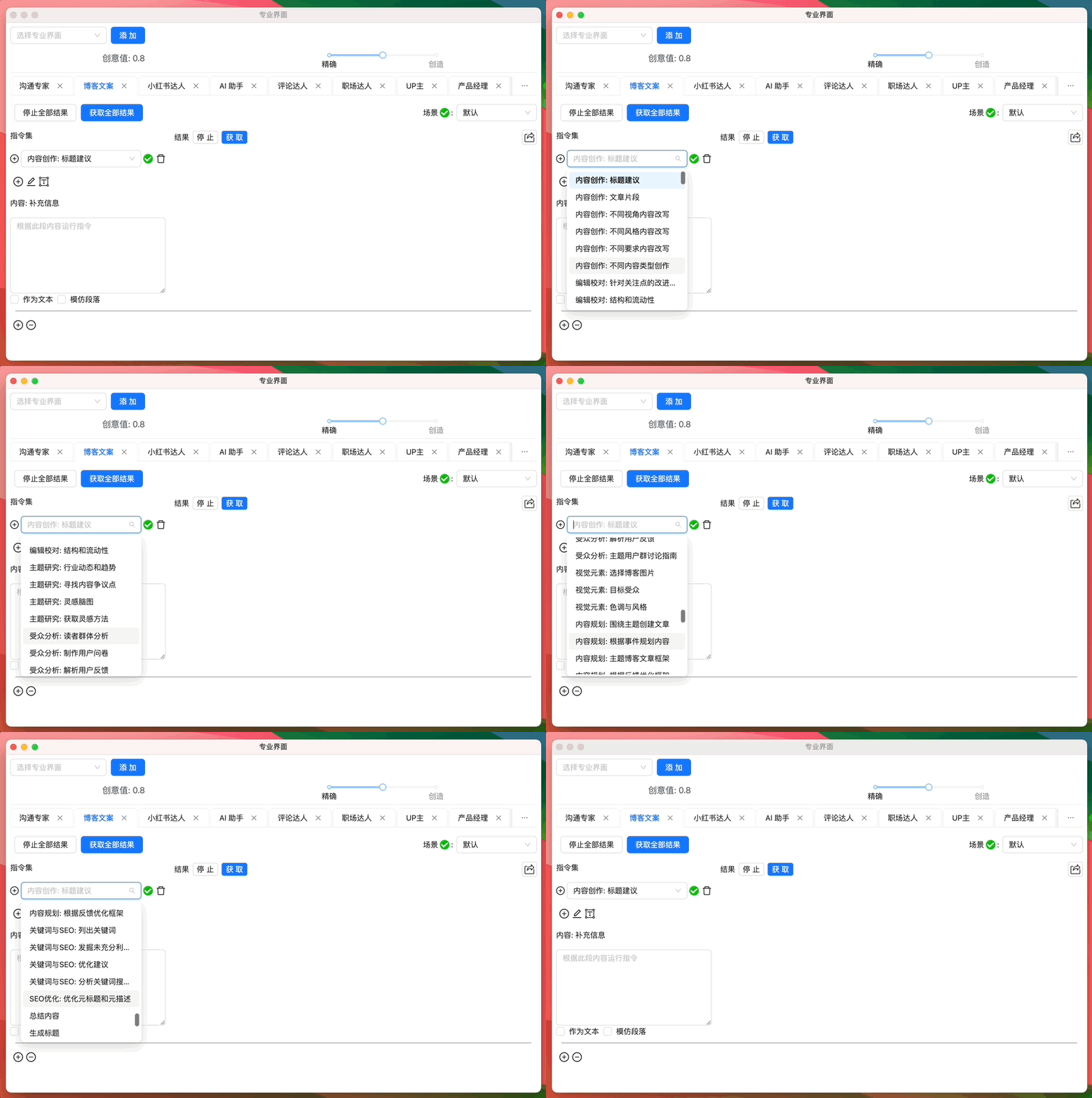
We believe that the upgrade of v0.1.30-OTA-2 will bring a comprehensive enhancement to your blog creation and SEO optimization experience. If you encounter any issues or have suggestions during use, feel free to provide feedback at any time.
2023-10-20-v0.1.30-OTA-1: XiaoHongShu Content Creation Module Upgrade, Making Self-Media Content Creation More Efficient
Product Introduction:
In this version, we have comprehensively upgraded the professional mode XiaoHongShu module, aiming to provide a superior self-media creation experience. We have formulated new content creation commands based on the content creation process, from Goal Setting, Audience Analysis to Topic Research and Conceptualization, to Content Planning, Framework Design, and Content Creation, providing you with a one-stop service, making your creation process more efficient.
Product Description:
- Goal Setting: Helps you clarify the goals of content creation, providing more targeted creative guidance.
- Audience Analysis: Understand your audience group, providing more precise audience positioning for your content creation.
- Topic Research and Conceptualization: Based on big data and industry insights, we provide you with hot and promising topic ideas.
- Content Planning: We provide you with complete content planning advice, helping you form an efficient creation process.
- Content Framework Design: We provide reasonable framework design for your content, making its structure clearer and more readable.
- Content Creation: Based on the above analysis and planning, ultimately generate content that is attractive and impactful.
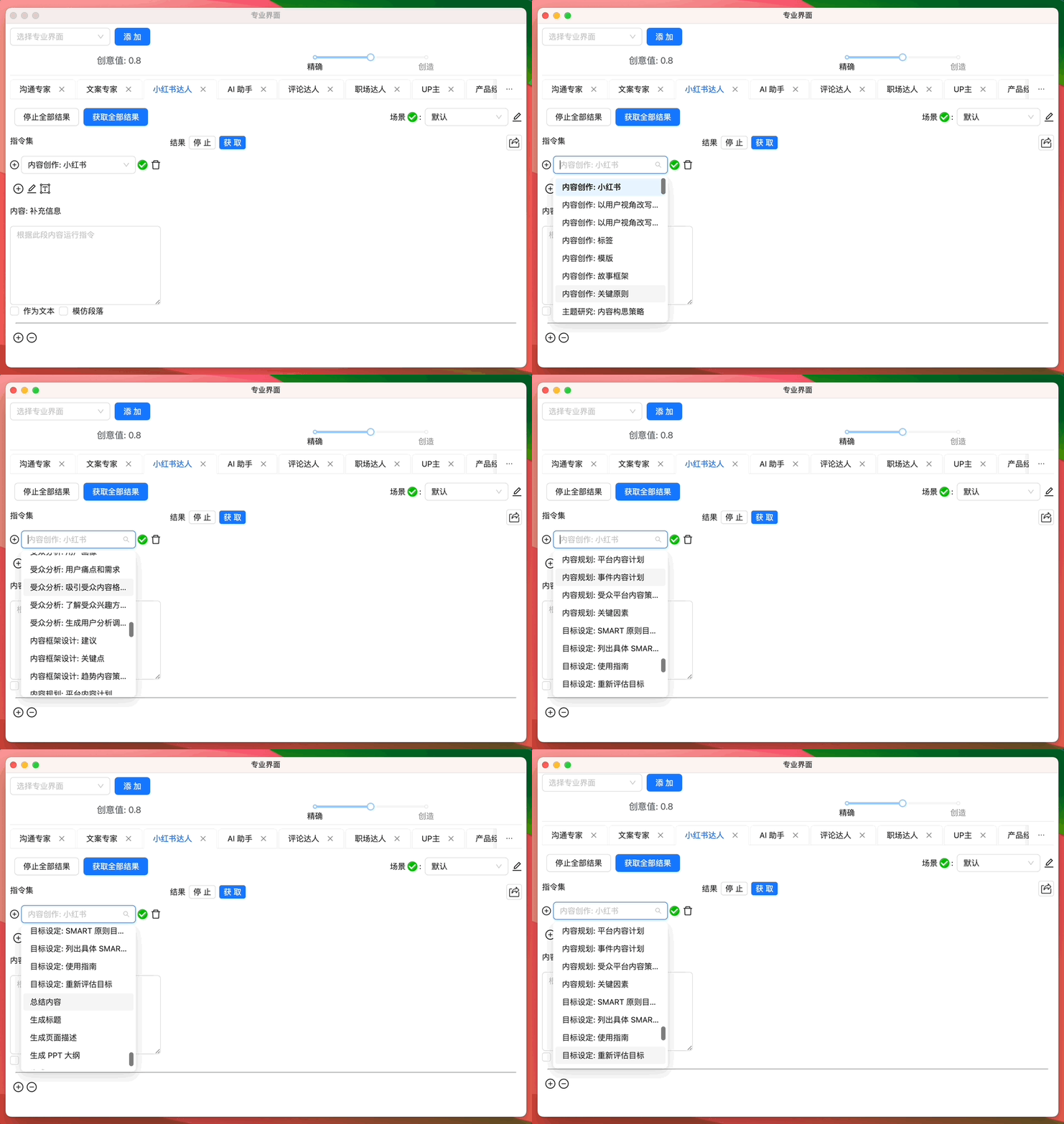
We believe this upgrade will make your self-media creation more efficient and effective, and we look forward to your feedback and suggestions. We are always working hard to provide you with better products and services. If you encounter any issues or have suggestions during use, feel free to provide feedback at any time.
2023-10-16-v0.1.30: ProMode Professional Mode Upgrade & Personalized Local Personal Document Assistant
Product Introduction:
We are excited to release our v0.1.30 version, which contains important updates to the ProMode Professional Mode and the brand-new Local Personal Document Assistant feature. We believe these new features will further enhance your product experience.
Product Description:
ProMode Professional Mode
- Based on continuous user feedback, we have updated the professional mode model and optimized the imitation case functionality, striving to provide users with a more professional and smooth user experience.
- The beauty section has also been completely rewritten, and the recommended tone and angle of the copy have been improved, ensuring that users receive more precise suggestions when using this feature.
Local Personal Document Assistant
We have introduced a new feature - the Local Personal Document Assistant. This is a powerful tool that allows users to build a fully personalized document assistant using their local text knowledge base. Whether you are conducting research, writing reports, or managing projects, this feature will make your work more efficient.
- Personalized Construction: The Local Personal Document Assistant allows users to use their local text knowledge base as a foundation to build a personalized document assistant. This means you can integrate all important information and knowledge in one place, making it convenient to consult and use at any time.
- Quick Access to Answers: By directly asking the Local Document Assistant, users can quickly and accurately obtain answers from the knowledge base. This greatly reduces the time spent searching for information, improving work efficiency.
As we release this new version, we promise to continue improving and optimizing this feature to meet user needs. We look forward to your use of this new feature and the convenience it brings. If you encounter any issues or have suggestions during use, feel free to provide feedback at any time.
2023-10-01-v0.1.0: First version
Dear users, we are excited to announce the launch of a powerful and easy-to-use prototype of GPT AI Flow!
In this version, we provide basic functionality to offer you a smoother and more efficient user experience. Here are the main highlights of this version:
- Enhanced Search Box Experience: To enhance the visual effect of the search box, we have introduced animation effects. When you enter content in the search box, you will see smooth transition animations, making your usage experience more pleasant.
- Optimized Global Variable Management: We have introduced electron-store to better manage global variables, making your use more stable and reliable.
- Creation of Floating Windows and Content Display: Through multi-window management, you can easily create floating windows and display window content below. This will help you better operate in a multitasking environment.
- Improved Software Settings Panel: In this version, we provide a software settings panel, making it easier for you to adjust and manage various settings.
- Local Storage and Message Management: We have enhanced the local storage functionality for message history and provided a message clearing option. Additionally, we provide paired displays of questions and answers for each message, facilitating quick review and understanding.
- One-Click Copy Function: We have designed a one-click copy function, allowing you to conveniently copy the latest answers, improving work efficiency.
- Smarter Input Handling: For long text inputs, we have optimized the user interface to provide a better visual experience. Additionally, when GPT is processing questions, we also provide real-time tips, keeping you informed of the processing progress.
- Built-in Commands and Custom Commands: In this version, we provide built-in command functionality and allow you to add commands, making operations more flexible.
- Interrupt Access Function: To give you more control during use, we have added a stop button and shortcut key function, allowing you to interrupt access at any time.
- Markdown Output Support: We have optimized the output function, allowing you to output content in Markdown format through simple commands, facilitating viewing and editing."""